
Error #2044: Unhandled skinError:. text=[IOErrorEvent type=”ioError” bubbles=false cancelable=false eventPhase=2 text=”Error #2036: Load Never Completed. URL: http://curtismorley.com/someURL/SkinUnderAllNoCaption.swf”]
Description:
Here is a combo meal deal of errors that you may get if you are using one of the basic video component skins in Flash. Flash needs to know where the file is and how it interacts with the video you are playing. The reason you will get this error is because the skin didn’t load and so Flash is trying to wrap this video skin around your video unsuccessfully which produces ActionScript Error 2044. I have always seen ActionScript 3 error 2044 coupled with ActionScript Error #2036 which says that the load of the skin never completed. I get this error because of the way wordpress handles includes.
Fix:
Put the file on the server and link to the file in the Flash Authoring Environment.
Step 1:
Convert your video into an FLV with either Flash itself or with the bundled Flash Video Encoder.
Step 2:
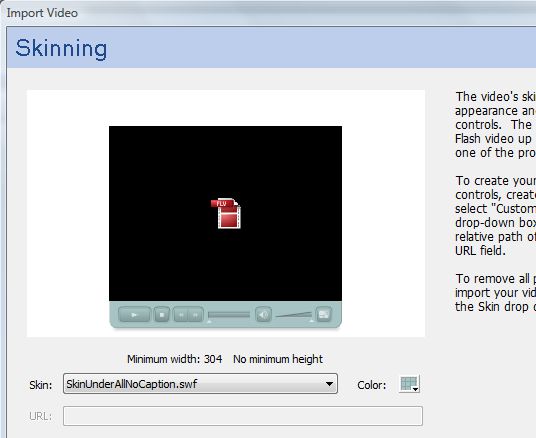
Import the video and go through the wizard provided. Make sure that you choose the skin you would eventually want to control your video. In the screenshot below I chose the SkinUnderAllNoCaption skin. This step is critical because it is necessary to have Flash auto generate a swf of the skin for you.
Step 3:
Save your file and you check the folder that your main swf is located in. You should find another file with the name of the skin you chose. In my case the file is called ‘SkinUnderAllNoCaption.swf’.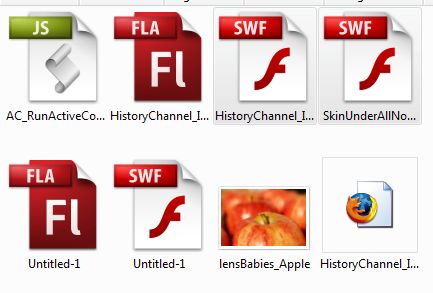
Step 4:
FTP the ‘skin’ swf to your server.
Step 5:
Open up your Flash file and select the video. Then go to the component ‘Parameters’ palette ad 2x click the ‘skin’ option as shown in the image below.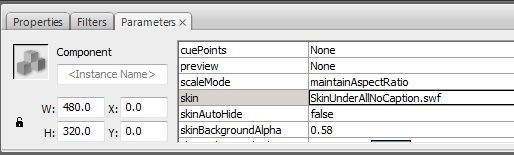
Step 6:
Choose the last ‘Skin’ option called ‘Custom Skin URL’ and then enter the URL of the skin swf into this field and click ok.

Step 7:
Don’t panic. The skin will most likely not display in the authoring environment. Hit <CTRL> + <ENTER> on your keyboard to test your movie and you will see the same lovely component that you had originally. The two files below show the file before testing your movie and after.
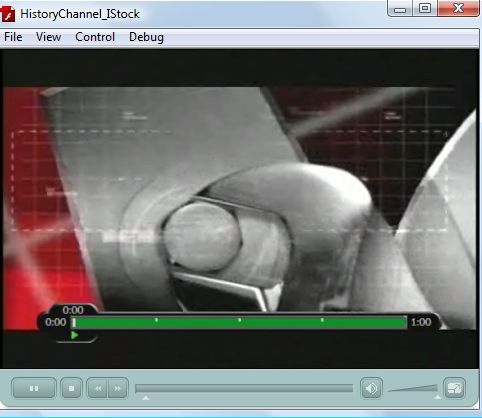
Step 8:
Upload your swf file to the server in the same place as your skin swf and enjoy.
Troubleshooting:
Make sure that you have a crossdomain.xml file on your server to prevent other ActionScript Errors.
You can see this in action at my post about ‘How I Made History’
Now you have a step-by-step description of how to deal with ActionScript Error #2044
As always – Happy Flashing
Excellent! Solved my problem perfectly. I’ve been looking everywhere for the solution, and no one made sense like you do. Thanks!
I AM PERUVIAN AND MY GOOD ERROR APPEARS ON THE SCREEN AFTER CLICKING ON DREAMWEAVER CS3 F12 AS AFTER THE FLASH CS3 ACTION SCRIPT 2 IF THE VIDEO appeared normal when Pressing ENTER CONTROL FOR EXAMPLE, YOU PUT THIS SO THAT ME PEDIA WAS GOING TO RELEASE AND THERE JUST CHOOSE FWS and the folder would keep
AND PUT IN FALSE PROPERTIES TO BE ME WHO CONTROL THE COMPONENTS OF PLAY WHERE THERE MARK IN TRUE
BUT WHEN I OPEN IT APPEARS ON THE SCREEN PHOTO ONLY AND ARE NOT ORIGINAL AND REPRODUCTION PARTS
Want to know what mechanisms can be used to been featured, announces that THE SCRIPT IN JAVA WITH THIS IS IMMERSED AC_RunActivecontent
HOPEFULLY YOU CAN TELL ME WHAT CAN I DO
SORRY FOR THE ORROGRAFIA USED AS A TRANSLATOR AND SEND THIS MESSAGE TO
Escuchar
Leer fonéticamente
Diccionario – Ver diccionario detallado
Del:español▼Al:inglés▼Traducción de texto o de páginas webBUENO SOY PERUANO Y MI ERROR APARECE EN LA PANTALLA DESPUES DE PULSAR F12 EN DREAMWEAVER CS3 PUES DESPUES DE QUE EN EL FLASH CS3 ACTION SCRIPT 2 SI APARECIA NORMAL EL VIDEO CUANDO PRESIONABA CONTROL ENTER PARA EL EJEMPLO; A ESTE LE PUSE LO QUE ME PEDIA QUE ERA IR A PUBLICACION Y AHI SOLO ELEGIR FWS Y LA CARPETA DONDE LO GUARDARIA
Y EN LAS PROPIEDADES PUSE EN FALSE PARA QUE SEA YO QUIEN CONTROLE LOS COMPONENTES DE REPRODUCCION AHI DONDE SE SEÑALO EN TRUE
PERO CUANDO LO ABRO EN LA PANTALLA SOLO APARECE LA FOTO INICIAL Y YA NO ESTAN LOS COMPONENTES DE REPRODUCCION
QUIERO SABER QUE MECANISMOS PODRE UTILIZAR PARA LOGRAR APARECERLOS, MANIFESTARE QUE EL SCRIPT EN JAVA CON EL QUE ESTA INMERSO ES AC_RunActivecontent
OJALA ME PUEDAS DECIR QUE PUEDO HACER
DISCULPEN POR LA ORROGRAFIA PUES E UTILIZADO UN TRADUCTOR PARA ENVIAR ESTE MENSAJE
Escribe texto o la dirección de un sitio web o traduce un documento.
Cancelar
Escuchartraducción del español al inglés
I AM PERUVIAN AND MY GOOD ERROR APPEARS ON THE SCREEN AFTER CLICKING ON DREAMWEAVER CS3 F12 AS AFTER THE FLASH CS3 ACTION SCRIPT 2 IF THE VIDEO appeared normal when Pressing ENTER CONTROL FOR EXAMPLE, YOU PUT THIS SO THAT ME PEDIA WAS GOING TO RELEASE AND THERE JUST CHOOSE FWS and the folder would keep
AND PUT IN FALSE PROPERTIES TO BE ME WHO CONTROL THE COMPONENTS OF PLAY WHERE THERE MARK IN TRUE
BUT WHEN I OPEN IT APPEARS ON THE SCREEN PHOTO ONLY AND ARE NOT ORIGINAL AND REPRODUCTION PARTS
Want to know what mechanisms can be used to been featured, announces that THE SCRIPT IN JAVA WITH THIS IS IMMERSED AC_RunActivecontent
HOPEFULLY YOU CAN TELL ME WHAT CAN I DO
SORRY FOR THE ORROGRAFIA USED AS A TRANSLATOR AND SEND THIS MESSAGE TO
Escuchar
Leer fonéticamente
Diccionario – Ver diccionario detallado
Awesome mate. Save the day 😀
double cheers!
THANK YOU…THANK YOU…THANK YOU…..!!!!!!!
I too was pulling my hair out….all day…..as a matter of fact….
You made this all incredibly clear,
and i have successfully embedded my first flash/skinned player.
You have taught me something i will forever use…
Eternally Greatful….really!
Dwayne
I know this might sound dumb but… I have uploaded my skin to the server but on your page where you have manually put in how to get to that skin how do you do that? I can not figure it out so I have no idea what to put in for the Custom URL section so it obviously can’t find anything right now. Please help!
Thank you so very very much for this and the crossdomain articles. Adobe.com was poor help for me but you got me straight in ten minutes 🙂
I have tried this, I put the swf file of the skin on my server and then updated the code for it in flash. When I tried bringing up the webpage again I got another error:
Error #2044: Unhandled skinError:. text=Error #2121: Security sandbox violation: Loader.content: http://samlynch.com/media/trajan.swf cannot access http://www.samlynch.com/media/SkinUnderPlayStopSeekCaptionVol.swf. This may be worked around by calling Security.allowDomain.
Does anyone know about the Secuirty.allowDomain call? Thanks!
It’s not the actual issue, but… how did you realize the time displays? it’s what I’m trying to figure out and I’m close to throw something really heavy outside the window…
I defined a class that holds the String values of the time (actual time & total time). I can access them from my custom skin, trace() gives me the correct values, but if I try writing them to my textfields it ONLY (??) works if when I publish the skin… the video-loading .swf won’t update the text fields (but trace is still outputting the right values…).
Thanks for your help.
Peter
Aris,
You are very welcome. I am very glad that I can help you.
Curtis J. Morley
you won’t believe how many hours/days i have spend due to error 2044.
Thanks very much for the tip. everything works fine after changing skin with the custom url.
cheers, aris.
I have tried what you suggested in your tutorial but it still doesnt seem to want to work.
I have to store the .swf and video flv files on a seperate domain (hosted by a third company) and then display the video + plus player on my website (the video is displayed dynamically dependant on the querystring). Do you think this is why the menu still wont appear but the video plays fine?
Any guidance would be much appreciated.
oh and it’s coupled with error 2032 not 2036
I’m getting this error but I have a feeling it’s for a different reason. The skin comes up and the movies play, but the player shows up in a few different spots. I have my player linked to a movie clip called “holder_mc” and it’s supposed to play different movies when I click a button. I never actually dragged the FLV player onto the stage, yet it shows up before I push the button, and even then it shows up in the wrong place. Also, when I press the button that’s supposed to call the player, a new player, in the correct place of the default color shows up. Any insight would be most appreciated.
Thanks Man!
Now I am having a problem with the video not even showing up on our pc using IE
Flypaper has some interesting prospects, that is until error 2036 poped up. I’ve read your fix report, but I’m not sure how to implement those fixes with Flypaper. The URL that I’m working on will not put the image on screen. Any ideas?
Art,
Thanks for the kind words. I am very glad that I could help. My goal is to have all ActionScript Errors with solutions and code/tutorials.
Thanks,
Curtis J. Morley
Curtis J. Morley,
You are the man, finding a solution to this error made me want to pull my hair out. After seeing what a simple fix this is it has saved me a lot of time and making streaming videos for myself has liberated me from the grasp of YouTube. Thank you and keep posting fixes, I’m sure I’ll be back.
Art Self
Ruth,
I know how you feel. I am really glad that this solved your issue with AS3 Error 2044. Flash Error 2036 and 2044 go hand-in-hand. I now have nearly 100 errors posted and will keeping doing my part to make Flash/Flex development easier and better.
Thanks
Curtis J. Morley
Thank you SO MUCH for this tip – I am creating a site for a client which is selling downloadable short videos, and for the previews I wanted to use an swf with bar – but the damned control bar wouldn’t show!
Firefox didn’t even give an error, just didn’t show it, but IE came up with Error #2036 – searching for this in google threw up your page, and by setting the URL of the skin manually I was able to resolve this problem …. only wish I’d found the error code 2 hours previously!!!!
Ryan,
Glad I could help.
Happy Flashing
Curtis J. Morley
thanks your page helped 🙂