11.02.10

Millenials Pick Android

Posted in Browser, Embedding, Flash, Marketing, Mobile, Social Media at 6:57 am by Curtis J. Morley

The Q3 results are in and it shows that the Android is becoming the phone of the Millenials. The Nielsen Company released the finding as part of it's ongoing research into Smartphone adoption.

Study shows that Android operating system is most popular among Millenials

Millenials Choose Android

So the question is why is Android gaining more adoption among Millenials? Do any of these factors play into it.

Cheaper Prices
Faster Speed (4G up to 10x faster)
Choice of Carrier (AT&T, Sprint, Verizon, T-Mobile, Etc...)
Choice of Hardware (HTC EVO 4G, Droid, DroidX, and over 15 more)
Customizable Interface (Homescreen interface, widgets, and more)
Cstomizable ROM (Make your phone be and do whatever you want. Not locked)
Better Camera (8+ mp on most current Androids)
Video Conferencing without need for a Wifi connection
Larger Screen (4.3-inch WVGA LCD)
8 person Wifi hotspot (Connect your laptop, ipad, and even iphone via wifi via android)
Streaming HD YouTube and other Video
Live TV
HDMI out
More Free apps than iPhone
Faster processors
Google Integration
Kick stand

and....

the ever controversial Flash enabled in the browser.

Let me know your thoughts. Why are Millenials buying Android?

03.06.10

7 Tips to Get Google To Read Your Blog

Posted in Blogging, Browser, Marketing, quicktip, Search Engine, SEO, Social Media, twitter, WordPress at 12:05 am by Curtis J. Morley

  1. Determine Beforehand the 1-3 Keywords You Want Google to Find.
    Before you type a single line, determine which keywords you will target with your post.  In other words, what do you want people to type into Google to find your blog post.  Once you have these keywords put them all over in your post in different variations.  You will notice that throughout this post I will include the terms; "Google Food", "Search Engine Indexing", "Google to Index your Site", "High Rankings in Google", "SEO and Google Ranking", etc... (Oh look I just added them again)

  2. Put at Least One of the Three Keywords in the Title.
    If you want Google to list you with a high search ranking for the word “Leadership”, an appropriate title would be, “Leadership for the Next Century.“ For Google to index your site, the way you want it indexed, you must have a title that contains at least one of these keywords. Because of the font size of the Header it will increase in importance according to Google's algorithm.

  3. Make Sure that WordPress (or whichever blogging software you use) is Setup to Create Each New Page URL the Same as the Title.
    In WordPress (the most common blogging tool which this site is based off of) Go to Settings >> Permalinks >> Select  >> and choose either “Day and Name” or “Month and Name”. The URL is critical to search engine indexing.  If the link says www.myblog.com/leadership vs. www.myblog.com/?p=123  it will be Google Food.

    One way to get Google to Read Your Blog

    One way to get Google to Read Your Blog

  4. Caption all Images with the Keywords Chosen.
    If your term is “Leadership” then insert an image that portrays leadership and then give it a title and caption that has the word leadership in it. Notice the caption of the image above.  The caption and title of this post reads nearly identical.

  5. Match Your Categories, Tags, Excerpt and Metadata to Your Keywords.
    Include several variations of the keyword terms in the tags, categories, and excerpts.  For example – Leadership in Action, Corporate Leadership, Leadership Consulting, Leadership Solutions, Organizational Leadership, etc...  This is an easy way to get high rankings in Google.

  6. Keep to a Theme
    Give your blog a theme and keep things organized within that theme.  Don’t write about your dog one day and U.N. Diplomacy another day.  Make sure that you are consistent in what you post. Google loves reading blogs that not only have appropriate keyword density on a page but keyword density across your whole site.

  7. Link to and From at Least Three Other Sites
    Do a Google search on the keyword that you are trying to target and start clicking on the most popular.  Find a way to comment on each of the top sites and make sure to include a link back to your blog.  Also, throw an update (with link) on Twitter.  Within your blog link over to other sites (including within your own site and other domains you own or use)  that will most likely link back to you.  The more links you can get the higher your "popularity" and Google is like a teenager the way it cares about popularity.  Another great site that has a lot of great info on SEO and Google ranking is my friend's site called Nick's Traffic Tricks

Thanks and Happy blogging.

Curtis J. Morley
02.18.10

RSS Feed Filter Tools

Posted in Browser, Interactive, Marketing, quicktip at 10:21 pm by Curtis J. Morley

Do you need a lot of info fast?  Do you need to be a maven in your industry?  Do you want every piece of info that your favorite newspaper or blog has - BUT you don't want irrelevant information that just gets in the way?  Here is your solution.  An RSS Filter tool.  Everyone loves a good RSS feed but nobody wants the information overload that goes with it.  Here are some of the tools that I suggest to get RSS feeds filtered just the way you like it.

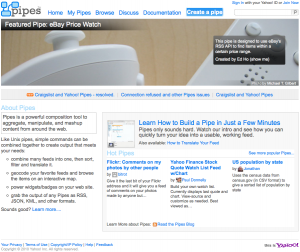
Yahoo Pipes

Yahoo's tool for creating RSS feeds that fit your style.  Everything from E-bay to business tools.

Yahoo Pipes RSS Feed Filter Tool

Yahoo Pipes RSS Feed Filter Tool

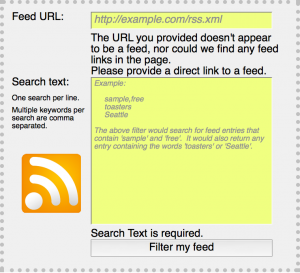
Feed Sifter

A nice tool that filters individual feeds.  It is an inclusive RSS filter rather than an exclusive RSS filter.

Feedsifter RSS Filter Tool

Feedsifter RSS Filter Tool

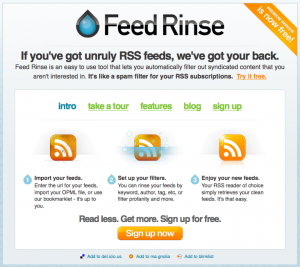
Feed Rinse

FeedRinse RSS Filter Tool

FeedRinse RSS Filter Tool

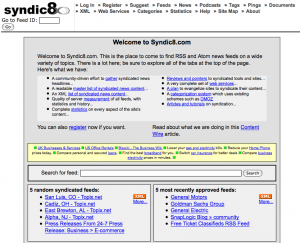
Syndic8.com

Not a pretty site but it works well for RSS aggregation

Syndic8 RSS Filter Tool

Syndic8 RSS Filter Tool

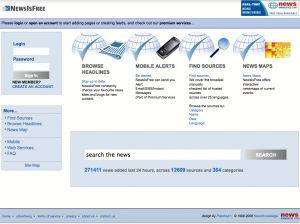
Newsisfree

This company has been around a while and has a suite of tools for RSS feeds and filtering

NewsIsFree RSS Filter Tool

NewsIsFree RSS Filter Tool

Moreover

An RSS company that has created fantastic business-oriented channels and tools.

MoreOver RSS Filter Tool

MoreOver RSS Filter Tool

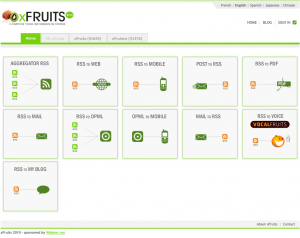
xFruits
The perfect way to slice and dice all of your RSS.
xFruits RSS tools

xFruits RSS tools

I hope this helps you get a tremendous amount of info while simplifying your life.
Happy Filtering
Curtis J. Morley

07.22.09

Which Browsers Come Preinstalled with Flash Player?

Posted in Adobe, Browser, Flash, Flash 10, Flex at 8:45 pm by Curtis J. Morley

Here is the quiz of the day.
Which Browsers Come Preinstalled with Flash Player?

Icons for IE8, Chrome2, Safari 4, Firefox 3, Opera 9

Icons for IE8, Chrome2, Firefox 3, Safari 4, Opera 9

Which Browsers come preinstalled with the Flash Player plugin pre-installed?

  1. Internet Explorer 8 (8.0.7100.0)
  2. Google Chrome 2 (2.0.172.37)
  3. Firefox 3 (3.51)
  4. Opera 9.7 (9.64)
  5. Safari 4 (4.0.2)
Find out the answer after the break.
Break
If you guessed Internet Explorer 8 you would be right.  The way I found this out is because our computer failed and I took it in to get it fixed at EBC computers who did a great job (a little pricey) and replaced the harddrive and installed Windows 7 as the OS.  The first thing I did (after plugging it into our 25" monitor at home) was to download the various browsers.  I then saw the page on Opera Mobile and wanted to check it out.  Surprisingly none of the browsers (including Opera which was the site I was on requiring Flash Player) had the Flash Player preinstalled  except for Internet Explorer 8.
And here are the screenshots to prove it.
Google Chrome Flash Plugin Screenshot
Google Chrome isn't presintalled with Flash Player
Google Chrome isn't preinstalled with Flash Player
Safari Flash Plugin Screenshot
Safari Browser is not presintalled with Flash Player
Safari Browser is not presintalled with Flash Player but had a detiled pop-up
Firefox  Flash Plugin Screenshot
Firefox Browser is not presintalled with Flash Player.  This was pretty lame.
Firefox Browser is not presintalled with Flash Player. This was pretty lame.
Opera Flash Plugin Screenshot
Opera Browser is not presintalled with Flash Player.  The lamest of all.

Opera Browser is not presintalled with Flash Player. The lamest of all.

So what should you do if you run into this scenario?  Go to Adobe of course and Get the Flash Plugin.

Thanks and as always,

Happy Flashing

Curtis J. Morley

05.26.08

CS4 Beta’s are out.

Posted in Browser, quicktip at 10:26 pm by Curtis J. Morley

Adobe Releases CS4 Beta Products

Well we knew it wouldn't be long after the public release of Flash Player 10 that CS4 Betas would be released.  Currently you can download the beta of Dreamweaver CS4 and beta of Fireworks CS4.  There currently is no Flash Beta but of course you can author for Flash 10 with Flex 3 and SDK 3.0.

Dreamweaver and Fireworks are excellent tools that if you don't have you should get soon.  Especially with the new enhancements.  Here is a summary from the Adobe Labs website.

DreamWeaver CS4:

  • Live View
  • Related Files
  • Code Navigator
  • CSS best practices
  • Code hinting for Ajax and JavaScript frameworks
  • HTML data sets
  • Photoshop Smart Objects
  • Subversion integration
  • Adobe® AIR™ authoring support
  • New user interface

Fireworks CS4:

  • New user interface
  • CSS-based layouts
  • PDF export
  • Live Style improvements
  • Adobe type engine
  • AIR authoring

Thanks,

Curtis J. Morley

P.S.  I realize that the date on this post is before the actual date on Adobe Labs, but they always post the night before.  It may have something to do with global time.

01.16.08

Flex / Flash ActionScript Error #1095

Posted in Browser, Computers, errors, Flash, Flex at 10:43 pm by Curtis J. Morley

ActionScript Error #1095: Syntax error: A string literal must be terminated before the line break.

Description:
Error 1095 is a simple and fairly well described ActionScript Error. This error will appear when you have left off the closing double quote marks in a particular line. This is very closely related to AS3 Error #1094 which will help you out when you improperly use single quotes. You will most likely get AS3 syntax error 1083 and syntax error 1084 after this this one. These can most likely be ignored and will go away once the 1095 Error is taken care of

Fix:
End the string properly by putting double quotes in the proper place

Bad Code:

trace("This is missing a double quote + someVar);

Good Code:

trace("This is not missing a double quote"+ someVar);

Related ActionScript Errors - AS3 Error #1094, AS3 Error 1084

This ActionScript Error is a quick one. I hope this helps you solve it.

As always Happy Flashing

11.06.06

The Greatest Mozilla Firefox Extension Ever.

Posted in Browser, Flash, testing at 10:54 pm by Curtis J. Morley

So I was surfing the other day and I came across a Mozilla Add-on that is fantastic. This Firefox Extension is a huge time saver and an amazingly wonderful tool for any Flash Developers out there.

Of course this Firefox extension was built by Alessandro Crugnola of Sephiroth. It takes a someone like Alessandro to make such a useful tool.

Download Flash Switcher here. http://www.sephiroth.it/weblog/archives/2006/10/flash_switcher_for_firefox.php
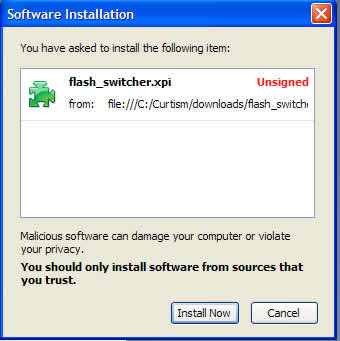
For those of you not familiar with how extensions work you will want to download the extension (.xpi file). Open it from the download window and then when the download window asks what program to open it with find Firefox.

This should bring up a window like this:

Install Flash Switcher

Click "Install Now" and then after you restart look for it down in the corner of the browser.

This Firefox Extension is a must for any serious Flash Developer
Happy Flashing with all versions of the Flash Plugin

P.S. My second favorite extension is the myStickies

Click Here ok cool kids