01.26.11
Posted in Augmented Reality, Speaking at 8:17 pm by Curtis J. Morley
What: Speaking at Training 2011
When: February 9th 12:30-3:30 (2 Weeks from today)
Where: Training 2011 Conference, San Diego Convention Center, Room C4
One of the hottest new technologies is Augmented Reality. You will learn through this clinic the easy ways to implement Augmented Reality into your training and websites. You will also learn how kinesthetic engagement can enhance the training from a presentation to a viral experience. You will learn the best practices around the technology and how to make augmented reality a user-driven experience. Learn to:
- Think differently about the web, mobile, and devices.
- Use AR to engage users in the learning.
- Create unique markers to your learning material.
- Create 3D objects with open source (Free) technologies. Learn about viral coefficient.
- Deploy on websites.
NOTE: Bring your own laptop computer with wireless internet capability to this session. Please also download Adobe Flash CS5, Blender 3D 2.49, Gimp, Flar Toolkit, Flar Starter Kit, and AR Marker Generator
I look forward to seeing everyone there. As always, Happy Flashing,
Curtis J. Morley
P.S. Scan this QR Code with your Android Phone or iPhone to set an appointment for the session.

Permalink
01.22.11
Posted in Mobile, SmartPhones at 3:06 pm by Curtis J. Morley
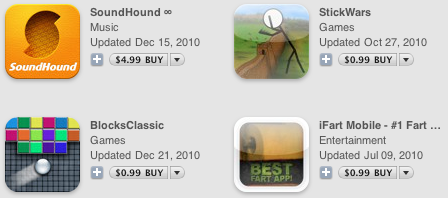
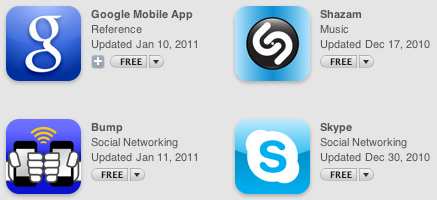
Yesterday I posted that iPhone Apps had hit 10 Billion. So what are the most downloaded Apps of all time? Which will be the 10 billionth app downloaded. As of yet the winning app has not been listed but anyone willing to guess ------"Angry Birds"? If CES was any indication then this is the year of the Birds. Angry ones. Here are some of the most downloaded apps to date:
All-Time Top Free iPad Apps


All-Time Top Paid iPad Apps


All-Time Top Free iPhone Apps


All-Time Top Paid iPhone Apps


The complete list can be found here - All-Time Top iPhone Apps, Top iPad Apps
What are your favorite apps?
Permalink
01.21.11
Posted in Mobile at 10:05 pm by Curtis J. Morley
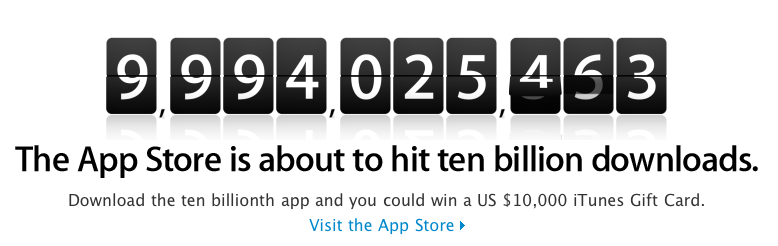
iTunes Apps Downloads to hit 10 Billion
The iTunes Store is about to hit a milestone in it's history and in the history of the world.

Apple reached the 10 Billion download milestone with iTunes music downloads 7 years after it's launch. The pace quickened with apps. Apps went from 2 billion downloads near the end of September '09, to 3 billion in January of last year. One year later we see that number jump to 10 Billion. There is no question the advances in the iPhone and more importantly the launch of the iPad in April 2010 was the major push toward 10 Billion number.
Ten Billion will soon be the total number of apps downloaded from the iTunes. So how big is 10,000,000,000 and who else has this as a milestone in their history? Ten Billion is a pretty big number. It is actually an enormous number. So how can we quantify 10 Billion. These are some of the milestones that have happened in the recent past in regards to 10 Billion.
10 Billion Milestones
What it costs to keep U.S. Government documents a secret - $10,000,000,000

The amount of money that Bill and Melinda Gates donated for vaccinations in 2010 - $10,000,000,000

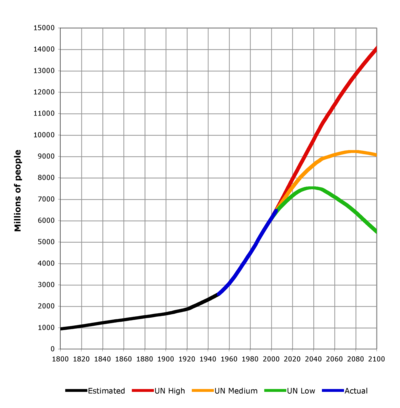
The population of people on the planet earth in the year 2050. - 10 Billion people

The number of qubits it takes to build a basic but functional Quantum Computer - 10 Billion Qubits

1/3 the pieces of content posted each month on Facebook - 30 Billion images, links, videos, etc...

Total Number of Tweets up to March 13, 2010 - 10,000,000,000 total tweets

The Number of YouTube views in 5 days - Ten Billion Views

A Bank Note Issued by the Zimbabwean Government issued in 2008 - (Talk about inflation. I found it so cool that I ordered the 50 Trillion off of eBay)

How long before you or your company hits a ten billion milsetone?
Permalink
01.07.11
Posted in Flash at 6:21 am by Curtis J. Morley
What is an Augmented Reality Marker?
An Augmented Reality Marker is a black and white image that has a border and pattern inside. The marker is held up in front of a webcam which overlays (or augments) the live video with additional material. The augmented reality marker below is a good example of an augmented reality marker. It is for one of my favorite examples by GE called:
Plug Into the Smart Grid

You can see a list of other augmented reality markers (and even print a sheet of them to save paper) from my previous post.
Guidelines for creating an Augmented Reality Marker
- Your marker needs to be a Square Box.
- The marker should have a 40mm Square Border (this can be smaller as shown above but it will not be as accurate in the final example. The thinner the border the harder it is to recognize).
- The marker should be printed at a minimum of Two inches (2").
- Use a simple pattern inside the box. The more simple the better the augmented reality will work.
- Everything else is creativity. (The most creative augmented reality marker I have seen is from www.VampirePowerSucks.com)
Step-by-Step Instructions for Making Your Logo into an Augmented Reality Marker using Gimp
- Create a new file. File >> New
- Set the width and height to 8.5 x 11 inches (612 x 792 pixels, or 215.9 x 279.4mm)
- Using the "Rectangle Select" tool [R] create a 4" square in the middle of the page.
- Hold the [SHIFT] key and start dragging from 2.75" horizontally and 3" on vertical axis.
-Drag down to 6.75 and 7 respectively
- Use the "Bucket" [B] tool and fill the square with black
- Again using the "Rectangle Select" tool [R] create a 2" square centered inside the original box.
- Hit the [DELETE] key
- Open your logo file in GIMP (Make sure that the logo is entirely black if not select it with the "Fuzzy Select Tool and then fill it with Black)
- Select your logo file and put it inside the border
- Type your URL at the top of the page so that people will remember where to go to see the augmented reality working.
- Save the file as a PDF. This is really not intuitive in GIMP. Instead of "Save As" you have to click "Print" and then select "Print to file"
- Post this to your website and you are done.
As Always Happy Flashing,
Curtis J. Morley
Permalink
01.06.11
Posted in Flash at 12:25 am by Curtis J. Morley
The entire purpose of this post is to have a place that I can find my favorite AR markers to use with my smart phone instead of printing them out. I was wasting a lot of paper on printing out these Augmented Reality Markers and thought, "I have to stop wasting the planet like this."
Pull up this site on your computer and on your smart phone and you won't have to waste another piece of paper on the sites below.
Doritos combined a music video and Augmented Reality to let you choose the way you want to watch Rihanna sing.
http://www.doritoslatenight.com/

USPS let's you size your package before you run down to the local post office.
https://www.prioritymail.com/simulator.asp

iGo Power strips that save you energy and money
http://www.VampirePowerSucks.com

GE Ecomagination Plug into the Smart Grid
http://ge.ecomagination.com/smartgrid/#/augmented_reality

The next one does not have a website but is for testing purposes while developing with the FlarToolkit StarterKit

The following augmented reality marker doesn't have a website either. But may in the near future.

A Page full of Augmented Reality Markers
Permalink
01.05.11
Posted in Flash at 6:44 am by Curtis J. Morley
The purpose of this post is to link to the tools needed to create Augmented Reality.
Flash CS5 or Flash Builder4(Flex)
Blender 3D 2.59 (or higher)
GIMP 2.6 (or higher)
FlarToolKit Starter Kit by Saqoosha
ARToolkit Marker Generator by Saqoosha
Download each of these files and you will have everything you need to create augmented reality.
Permalink