ActionScript Error #1150: The protected attribute may be used only on class property definitions.
Description:
This ActionScript Error justs means that you have used the access control modifier 'protected' in the wrong spot. There are four access control modifiers - public, private, internal, and protected. Each of these specify how the method or variable is accessed. Each access control modifier has it's own error but they all mean the same thing. Access control modifiers need to be used in the right place. The 'internal' and 'public' can only be used inside a 'package' and 'private' and 'protected' can only be used on classes.
Fix:
Make sure to only use the 'protected' access control modifier to define a method or variable within the class itself and not within a method(function).
ActionScript Error #1115: The internal attribute can only be used inside a package.
Description:
This ActionScript Error justs means that you have used the access control modifier 'internal' in the wrong spot. There are four access control modifiers - public, private, internal, and protected. Each of these specify how the method or variable is accessed. Each access control modifier has it's own error but they all mean the same thing. Access control modifiers need to be used in the right place. The 'internal' and 'public' can only be used inside a 'package' and 'private' and 'protected' can only be used on classes.
Fix:
Make sure to only use the 'internal' access control modifier to define a class, method or variable within a package and not inside the class itself nor within a method(function).
ActionScript Error #1114: The public attribute can only be used inside a package.
Description:
This ActionScript Error justs means that you have used the access control modifier 'public' in the wrong spot. There are four access control modifiers - public, private, internal, and protected. Each of these specify how the method or variable is accessed. Each access control modifier has it's own error but they all mean the same thing. Access control modifiers need to be used in the right place. The 'internal' and 'public' can only be used inside a 'package' and 'private' and 'protected' can only be used on classes.
Fix:
Make sure to only use the 'public' access control modifier to define a method or variable within a package and not inside the class itself nor within a method(function).
ActionScript Error #1013: The private attribute may be used only on class property definitions.
Description:
This ActionScript Error justs means that you have used the access control modifier 'private' in the wrong spot. There are four access control modifiers - public, private, internal, and protected. Each of these specify how the method or variable is accessed. Each access control modifier has it's own error but they all mean the same thing. Access control modifiers need to be used in the right place. The 'internal' and 'public' can only be used inside a 'package' and 'private' and 'protected' can only be used on classes. AS3 error 1013 can also be caused if you misplace a method identifier like ':void'
Fix:
Make sure to only use the 'private' access control modifier to define a method or variable within the class itself and not within a method(function).
Description: Here is a combo meal deal of errors that you may get if you are using one of the basic video component skins in Flash. Flash needs to know where the file is and how it interacts with the video you are playing. The reason you will get this error is because the skin didn't load and so Flash is trying to wrap this video skin around your video unsuccessfully which produces ActionScript Error 2044. I have always seen ActionScript 3 error 2044 coupled with ActionScript Error #2036 which says that the load of the skin never completed. I get this error because of the way wordpress handles includes.
Fix: Put the file on the server and link to the file in the Flash Authoring Environment.
Step 1:
Convert your video into an FLV with either Flash itself or with the bundled Flash Video Encoder.
Step 2:
Import the video and go through the wizard provided. Make sure that you choose the skin you would eventually want to control your video. In the screenshot below I chose the SkinUnderAllNoCaption skin. This step is critical because it is necessary to have Flash auto generate a swf of the skin for you.
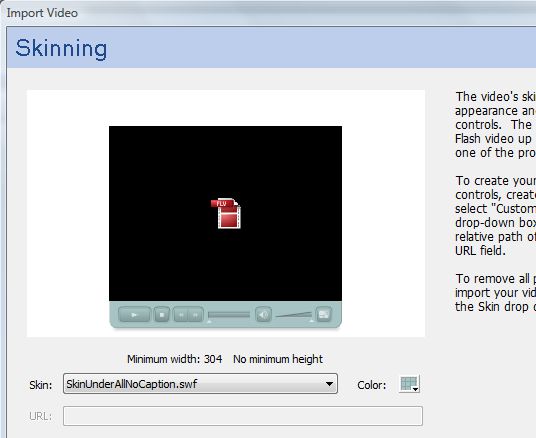
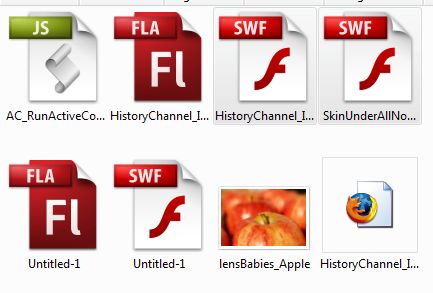
Step 3: Save your file and youcheck the folder that your main swf is located in. You should find another file with the name of the skin you chose. In my case the file is called 'SkinUnderAllNoCaption.swf'.
Step 4:
FTP the 'skin' swf to your server.
Step 5:
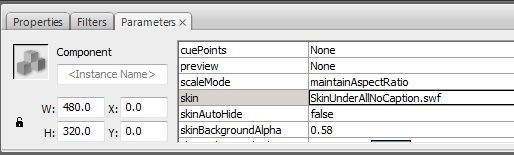
Open up your Flash file and select the video. Then go to the component 'Parameters' palette ad 2x click the 'skin' option as shown in the image below.
Step 6:
Choose the last 'Skin' option called 'Custom Skin URL' and then enter the URL of the skin swf into this field and click ok.
Step 7:
Don't panic. The skin will most likely not display in the authoring environment. Hit <CTRL> + <ENTER> on your keyboard to test your movie and you will see the same lovely component that you had originally. The two files below show the file before testing your movie and after.
Step 8:
Upload your swf file to the server in the same place as your skin swf and enjoy.
Troubleshooting:
Make sure that you have a crossdomain.xml file on your server to prevent other ActionScript Errors.
You can see this in action at my post about 'How I Made History'
Now you have a step-by-step description of how to deal with ActionScript Error #2044
Flex 2/ Flash CS3 Warning / Error #3590: String used where a Boolean value was expected. The expression will be type coerced to Boolean.
or
Warning: 3590: int used where a Boolean value was expected. The expression will be type coerced to Boolean.
Description: This is a ActionScript error is more of a warning than a true AS3 error. It will be displayed in strict mode and simply means that you have quotes around your Boolean value. Even though you may get this AS3 error it won't prevent Flex or Flash from compiling nor ActinoScript code. It will convert it for you though. Thanks Flash for doing that for us.
AS3 Warning #3590 Fix 1: Make sure that your boolean (true or false is not inside quotes).
Bad Code 1:
myObject.visible = "false";
Good Code 1:
myObject.visible = false;
AS3 Warning #3590 Fix 2: ActionScript 3 uses true and False rather than 0 and 1 for boolean. Although it does allow 0 to make it through without giving this error.
Bad Code 2:
myObject.visible = 1;
Good Code 2:
myObject.visible = true;
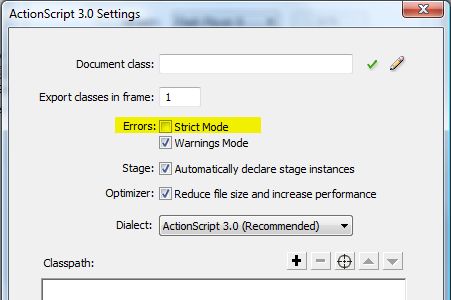
AS3 Warning 3590: Fix #3 - *Warning* This method will solve the problem temporarily and allow you to publish your code BUT it will cause you many headaches later. You will not get any warnings or error messages and this is a bad thing I Promise! If you are going to proceed down this path make sure to recheck these boxes after you are done publishing your one problem movie. With that much said, The way you do this is to turn off Strict (Verbose) Error Messages in your preferences as shown below.
Go to File >> Publish Settings >> Click on the "Flash" tab >> Next to "ActionScript version:" click the "Settings..."
AS3 Warning 3590 is pretty easy and straight forward.
I made history literally - the History Channel. I found out that my picture of college football was used on the History Channel show Modern Marvels - 70's Tech. The show used my photo in a graphic representation of how LCD's were the predecessors of DLP TV's. At first the photo shows up very small in one little section of the screen and as I was watching the show I thought that the photo looked just like a sports shot that I had taken. Then the picture enlarged and sure enough it was one of my football stock photos. I was pleasantly surprised.
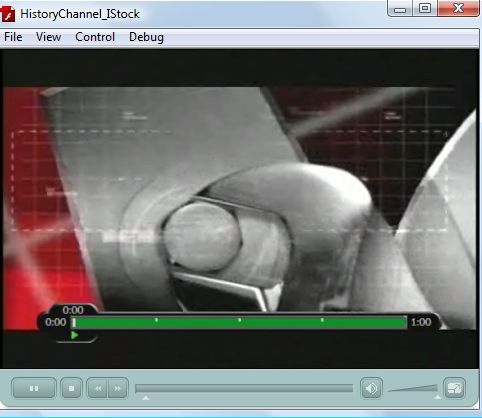
And here is a small clip of the show ending at my photo. Thanks History Channel.
I will be speaking at the SLC Photo Club Nov 17th. The topic of the meeting is still life and I will be presenting on the amazing new lens called the Lensbabies. This highly reviewed lens is amazing and saves enormous amounts of time in Photoshop. Famed photographers such as Kevin Kubota (ranked Top 10 wedding photographers by Popular Photography Magazine) use this lens to make his subject matter have that dreamy ethereal look that every new bride wants. This lens is great for weddings, portraits, still life & flowers, food, commercial, and stock photography.
Here is an example picture of apples shot with Lensbabies 3G. The Lensbabies let you capture a selective focus and really make the subject matter pop. No Photoshop required. Come to the meeting to see many more.
My presentation will be a hands on demonstration that will allow photographers to use the Lensbaies 3G, and the Lensbabies 2.0 with the telephoto and wide angle attachments. I will have my Lensbabies 3G at the workshop as well as a 3G and 2.0 for the Nikon and 3G and 2.0 for the cannon mount. I will demonstrate the differences in the apertures and have a slideshow on the results of each aperture.
All attendees will receive a discount code for 10% off any of the products from LensBabies. Go to SLC Photo Club to sign up.
Error #1100: Syntax error: XML does not have matching begin and end tags.
Description:
Here is another easy AS3 error. This Flex/Flash Error means that your XML is not valid because the end tag is simply missing. *Note: This AS3 error is similar to ActionScript Error #1085
Solution:
Close that end tag.
Bad Code 1
var dogXML:XML = new XML();
dogXML =
<dog> <name>Fido
</dog>
Good Code
var dogXML:XML = new XML();
dogXML =
<dog> <name>Fido</name>
</dog>
I hope this helps you solve ActionScript Error #1100
TypeError: Error #1085: The element type "name" must be terminated by the matching end-tag "</key>".
Description:
Here is another easy AS3 error. This Flash Error means that your XML is not valid because the end tag either does not match the opening tag or that the tag is simply missing. When it says "The element type" it is talking about the XML element. In my case this would be <name>. *Note: This AS3 error is similar to ActionScript Error #1100
Solution:
Check your spelling and make sure that you have properly nested tags.
Bad Code 1
var dogXML:XML = new XML();
dogXML =
<dog>
<name>Fido</namer>
</dog>
Bad Code 2
var dogXML:XML = new XML();
dogXML =
<dog>
<name>Fido
</dog> </name>
Good Code
var dogXML:XML = new XML();
dogXML =
<dog>
<name>Fido</name>
</dog>
I hope this helps you solve ActionScript Error #1085