01.16.08

Flex / Flash ActionScript Error #1095

Posted in Browser, Computers, Flash, Flex, errors at 10:43 pm by Curtis J. Morley

ActionScript Error #1095: Syntax error: A string literal must be terminated before the line break.

Description:
Error 1095 is a simple and fairly well described ActionScript Error. This error will appear when you have left off the closing double quote marks in a particular line. This is very closely related to AS3 Error #1094 which will help you out when you improperly use single quotes. You will most likely get AS3 syntax error 1083 and syntax error 1084 after this this one. These can most likely be ignored and will go away once the 1095 Error is taken care of

Fix:
End the string properly by putting double quotes in the proper place

Bad Code:

trace("This is missing a double quote + someVar);

Good Code:

trace("This is not missing a double quote"+ someVar);

Related ActionScript Errors - AS3 Error #1094, AS3 Error 1084

This ActionScript Error is a quick one. I hope this helps you solve it.

As always Happy Flashing

10.18.07

Flash SEO - Google Analytics and Flash Overview

Posted in Computers, Flash, Flex, SEO, Search Engine at 11:54 pm by Curtis J. Morley

What is the most effective way to use Google Analytics and Flash?

How would you like to be able to know exactly how people are accessing your site and what they do when they are there? With Flash you can. And Google has provided the back end system free of charge for you to do it. It is called Google Analytics.

Google and Flash can show you exactly what people are doing on your site. I know how many people are mousing over the Flash piece. I know how many people are clicking a certain button. I know how many times a button is rolled-over without being clicked. I know how long the mouse is over the object. I can know every piece of data that is possible to know about what and how my users are interacting with the page, advertisement or application.

There are three key components in using Google Analytics combined with your Flash/Flex application or website. First is determining what you want tracked and how you want to use the statistics, the second is creating a Google Analytics account and setting up the proper filters etc.., the third is setting up the code in Flash and Javascript.

This is part 1 of a 5 part series on how to accomplish each of these areas.

Stay tuned for
Part 2 - "What Flash events should & shouldn't be tracked with Google Analytics?" coming soon.

As always Happy Flashing.

08.31.07

Flash CS3 / Flex 2 AS3 Error #2148

Posted in Computers, Error, Flash, Flex, errors at 5:48 am by Curtis J. Morley

ActionScript Error #2148:
SecurityError: Error #2148: SWF file file:///C:/Documents and Settings/UserProfile/Desktop/flexstore/bin-release/flexstore.swf cannot access local resource myFile.swf. Only local-with-filesystem and trusted local SWF files may access local resources.

Description:
ActionScript Error #2148 can be caused by a number of reasons. If you are using Flex please keep in mind that the bin directory is a special directory that the Flash player allows SWFs ( and other files ) to load from as long as the file is stored in this directory. It will also allow a loaded swf to access network resources (a remote HTTPService call for example). If these files are placed anywhere besides the bin directory, the Flash Player prevents the file from accessing any external resources. You can allow for external access by changing the settings within the FlashPlayer or within Flex. These solutions are listed below

Fix 1 :
If you're loading in XML or other files from a remote sever that isn't hosting the SWF too, make sure you create a crossdomain.xml policy, and put it on the root of your webserver. If you haven't heard about a cross domain policy or need help creating a crossdomain.xml file click the link and I will show you how to create a crossdomain.xml file. View my tutorial on How to Create a crossdomain.xml file and visit the links on the bottom of the page to learn more.

XML Code:

<?xml version="1.0"?>
<!DOCTYPE cross-domain-policySYSTEM "http://www.macromedia.com/xml/dtds/cross-domain-policy.dtd">
<cross-domain-policy>
<allow-access-from domain="www.curtismorley.com" />
<allow-access-from domain="curtismorley.com" />
</cross-domain-policy>

Fix 2:
Within ActionScript you are now able to specify the cross domain access from within the code. I won't get into the guts of this one but if you want to learn more view the Flash / Flex documentation or Adobe LiveDocs - Security Chapter or get Joey Lott's book ActionScript 3 Cookbook By adding this code you will get rid of ActionScript Error #2148 If you are using https:// you will need to use allowInsecureDomain() as shown below. If you are using a local file make sure to target it correctly(i.e. c:\myFolder).

ActionScript Code:

flash.system.Security.allowDomain("http://www.curtismorley.com");flash.system.Security.allowInsecureDomain("http://www.curtismorley.com");

Fix 3:
One hack to get rid of ActionScript Error 2148 is to add these arguments to the compiler (via Properties - Flex Compiler) : -use-network=false . Beware though this will effectively change your cross-domain security.

Good Code:

-use-network=false

Fix 4:
Make sure your Global Security Settings in Flash Player allows local access to the directory your SWF/XML is running from. At the Global Security Settings in Flash Player click on Edit locations >> Add location and then either type in the new location your SWF is at (i.e. c:\myFolder) or browse for the file or folder. Shut down Flash/ Flex and all instances of the Flash Player(including browsers), and then try again. This will eliminate this ActionScript Error #2148. This solution only works for you on your computer. If you cahnge computers or change locations on the web please refer back to Fix 1.

And now you know 2 ways to fix and 2 ways to circumvent ActionScript Error #2418: Security Error

Happy Flashing

08.30.07

Flash CS3 / Flex 2 AS3 Error #1026

Posted in Computers, Error, Flash, Flex, errors at 10:33 pm by Curtis J. Morley

ActionScript Error #1026: Constructor functions must be instance methods.

Description:
You will get Flash / Flex Error 1026 if you have assigned the constructor of a class to be static. What you most likely wanted to do was create a static method within your class that can be called directly from the class itself rather than from an instance of the class. You are probably trying to create something like the Math.round() method within the Math class. This is a static method and can be called directly from the class.

Fix:
Remove the keyword 'static' from the constructor function within your class.

Bad Code:

public class MyStaticMethod
{
public static function MyStaticMethod()
{
public static function theRealStaticMethod (inputString):int

Good Code:

public class MyStaticMethod
{
public function MyStaticMethod()
{
public static function theRealStaticMethod (inputString):int

I hope that you didn't bang your head against the wall with AS3 Error 1026. It is an simple ActionScript Error to fix with a strange description.

Happy Flashing

08.20.07

Flash CS3 / Flex AS3 Error #1053

Posted in Computers, Flash, Flex, errors, quicktip at 11:01 pm by Curtis J. Morley

ActionScript Error #1053: Accessor types must match.

Description:
This is a great error that has absolutely no documentation. This is what Adobe has to say about it.

The non-error error.  ActionScript Error #1053 from Adobe Live Docs
Notice how the right side of the image doesn't have any text at all. It is simply left blank. To understand this error you need to understand what an 'Accessor' is. An 'Accessor' is a 'Getter' that accompanies a 'Setter'. The reason it is called an 'Accessor' is because it accesses the variable set using a 'Setter'.

So what does that mean for you. This error means that the Getter(Accessor) is not set as the same Type as the Setter.

Fix:
Make sure that whatever you return in the 'Getter' is the same 'Type' as what is set in the 'Setter'.

Bad Code:

function get sClickable():String {
return _clickable.toString();
}
function set sClickable(myClickable:Boolean):void {
this._clickable=myClickable;
}

Good Code:

public function get sClickable():Boolean {
return _clickable;
}
public function set sClickable(myClickable:Boolean):void {
this._clickable=myClickable;
}

So now you know how to solve ActionScript Error #1053.

As Always Happy Flashing.

08.13.07

Flash CS3 / Flex Error #2136: The SWF file file:///C|/Curtism/Flash/matchWordsGameTest.swf contains invalid data

Posted in Computers, Flash, Flex, errors at 8:37 pm by Curtis J. Morley

#2136: The SWF file file:///C|/Curtism/Flash/myFile.swf contains invalid data.

Fun error that you get when compiling the swf with an external AS file as your 'Document class'. Most Likely you will get this error if you are using a document class and also have code on your timeline.

Fix :

Remove the code from your timeline or remove the Document Class

As Always Happy Flashing

11.15.06

Why I wish I had DirectPointe at Home or Blue Screen of “Boredom”?

Posted in Computers at 3:29 am by Curtis J. Morley

So, the other day I started my computer and it seemed to boot normally. I logged into to my user account and then I waited for my computer to boot up,
and waited..............
and waited.......................................
and waited................................................................
and waited.............................................................................................
and the only thing on the screen was a nice solid blue background and my mouse. I could tell that my computer was running because I could move the mouse and the fan would kick on. But there were no icons, no start menu, no taskbar or any bars of any kind.

It scared the livin' bah-jeebers out of me (and I got really bored waiting)
That same day my wife let me know that she has "a virus thingy" on her computer. So I had to use her virused computer to research why my blue screen of death (no, boredom) computer wouldn't load up anything.

It turns out that with the help of many forums that I was able to get my computer back to normal. It turns out that windows explorer was not starting.

I know - weird! You're probably thinking why would windows explorer not start? I was thinking the same thing.
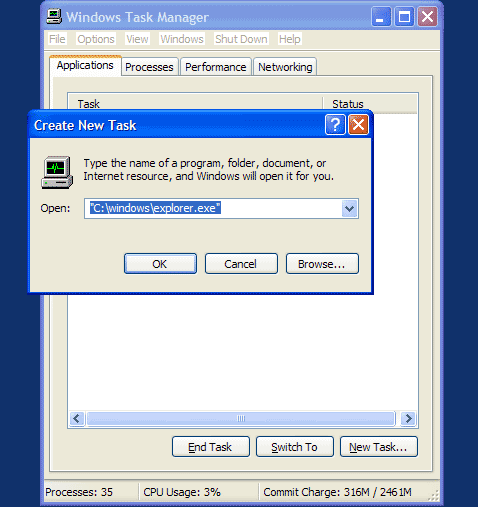
It still has the same issues but I simply open "Windows Task Manager" (hit CTRL + ALT + DELETE) and then I click on "New Task" and this brings up a dialog box that looks like this-

Task Manager

If you are having this same issue just put in the path to start Windows Explorer "C:\windows\explorer.exe" and click "OK" and you should be fine. I suspect that it has something to do with the new hard drive I purchased and how I disconnect it from my laptop.

Directpointe could have figured out my problem using the remote support tool that they have and could have solved my wifes virus problem before she even got it. The computer support that DirectPointe has is fantastic and virtually bulletproof.

As it was I had to do the computer data backup myself and then restore the system from the ground up. That got rid of her viruses and it got rid of about 2 hours of my time. The reinstall of Microsoft Windows sped up the computer dramatically but for some reason the restore CD's didn't put in all of the drivers. So there are some components that are still missing the drivers.

So to wrap up the story, I still get the "Blue Screen of Boredom" every time I use my "myBook" hard drive with my laptop and my wife is missing drivers to her computer, and I really wish I had the Outsource my IT to DirectPointe for my home.